
Download TattooDesignPro – AI Tattoo Design Generator, Free & Secure
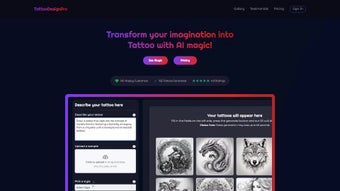
TattooDesignPro is an innovative, AI‑driven web application that transforms ideas, sketches, or simple text prompts into fully realized tattoo artwork. Whether you’re a seasoned tattoo artist looking for fresh concepts or a first‑time client eager to visualise a personal symbol, TattooDesignPro delivers custom designs in a matter of seconds. The platform supports an extensive library of styles—from traditional Americana and Japanese irezumi to hyper‑realistic portraiture and minimalist line work—so users can experiment with countless variations before committing to ink.
Built with privacy, security, and ease of use at its core, the tool offers a smooth, browser‑based experience that requires no installation, making it accessible on Windows, macOS, Linux, Android, and iOS devices. Its intuitive interface, robust feature set, and reliable AI engine have quickly positioned TattooDesignPro as a go‑to resource for both hobbyists and professional studios during client consultations, design brainstorming sessions, and portfolio building. By eliminating the repetitive hand‑drawing phase, the software not only saves valuable studio time but also empowers artists to explore bold, unconventional ideas that might otherwise remain untested.
The result is a faster, more collaborative design process that enhances client satisfaction and drives repeat business for tattoo shops worldwide.
Key Features, Compatibility & Benefits
TattooDesignPro blends cutting‑edge machine learning with a user‑friendly design suite, delivering a powerful yet approachable solution for anyone interested in tattoo art. The AI model has been trained on millions of tattoo images, enabling it to recognise subtle style nuances, anatomical placement considerations, and cultural symbolism. This depth of knowledge translates into designs that feel authentic and ready for the needle.
Because the service is entirely web‑based, it runs on any modern browser, guaranteeing cross‑platform compatibility. Whether you’re on a desktop workstation in a studio, a laptop at home, or a smartphone while on the go, TattooDesignPro adapts to your screen size without sacrificing performance or detail. Moreover, the platform prioritises data security: all user uploads are encrypted, and designs are stored temporarily unless you choose to save them to your personal account.
Feature List
- AI‑generated designs from text prompts, uploaded sketches, or reference images.
- More than 20 distinct tattoo styles, including traditional, tribal, watercolor, and biomechanical.
- Real‑time style switching and colour palette adjustments.
- High‑resolution vector export (SVG, PNG, PDF) for seamless studio workflow.
- Client‑shareable links with optional password protection.
- Integrated placement preview on 3D body models.
- Batch generation for multiple concepts in a single session.
- Secure cloud storage with 30‑day auto‑deletion for privacy‑focused users.
- Multi‑language support (English, Spanish, French, Japanese, German).
- Subscription‑free trial with unlimited design generation for 7 days.
The broad compatibility of TattooDesignPro means that studios can incorporate it into their existing digital workflow without the need for additional hardware or operating‑system‑specific software licences. Windows, macOS, and Linux users simply access the platform via Chrome, Edge, Firefox, or Safari, while Android and iOS users enjoy a fully responsive experience on their mobile browsers. This universal accessibility reduces friction, accelerates the design approval process, and ultimately helps both artists and clients arrive at a confident decision faster. In addition, the platform’s cloud‑first architecture ensures that updates and new style packs are rolled out automatically, so users always benefit from the latest AI improvements without manual patches or downloads.
Installation, Usage & Practical Workflow
Getting started with TattooDesignPro is intentionally straightforward. As a cloud‑native service, there is no traditional installation—just a secure sign‑up and you’re ready to explore. Follow these steps for a smooth onboarding experience and discover how the tool can become an integral part of your daily studio routine.
Step‑by‑Step Guide
- Create an account: Visit tattoodesignpro.com and register with an email address or social login (Google, Apple). Verification is completed via a single confirmation email.
- Select a creation mode: Choose between “Text Prompt”, “Upload Sketch”, or “Reference Image”. For text prompts, describe the concept (e.g., “minimalist rose on the inner forearm”). For uploads, drag‑and‑drop a rough drawing or photo.
- Define style parameters: Pick a style from the dropdown, adjust line thickness, shading intensity, and colour palette. The AI instantly previews variations, allowing you to compare at least three distinct looks before committing.
- Generate designs: Click “Generate”. The AI processes your input within seconds, returning 3‑5 unique designs. Use the “Regenerate” button for additional options or to fine‑tune a particular element.
- Refine & customise: Fine‑tune any design using the built‑in editor—move elements, resize, or add text. Toggle the 3D placement preview to see how the tattoo wraps around the chosen body part, and experiment with different body orientations for a realistic view.
- Export & share: Once satisfied, export the final design as SVG for vector scalability, or PNG/PDF for quick sharing. You can also generate a shareable link with optional password protection for client reviews, which can be set to expire after a defined period.
- Save to your library: All exported files are saved to your personal cloud library, accessible from any device. Designs are automatically purged after 30 days unless you manually archive them, ensuring compliance with privacy regulations.
- Integrate with studio tools: Import the exported SVG into Adobe Illustrator, CorelDRAW, or Procreate for further artistic refinement, stencil preparation, or colour‑proofing before the final in‑studio session.
- Collect feedback: Use the built‑in comment system to annotate designs directly within the platform, making it easy to capture client preferences during the consultation and iterate in real time.
The workflow is deliberately crafted to mirror a real studio consultation. Artists can use the platform live during client meetings, instantly showing multiple concepts based on the client’s feedback. The rapid iteration capability eliminates the need for multiple sketching sessions, saving valuable time. Additionally, TattooDesignPro’s export options integrate seamlessly with popular design tools like Adobe Illustrator, Procreate, and CorelDRAW, ensuring that studios can continue refining the artwork in their preferred environment before finalising the stencil.
Pros, Cons, Frequently Asked Questions & Review
Pros
- Speed: Generates high‑quality designs in seconds, dramatically reducing concept‑development time.
- Versatility: Supports a wide array of styles and body‑placement previews.
- Cross‑platform: Works on any modern browser across Windows, macOS, Linux, Android, and iOS.
- Secure & private: Encrypted uploads, temporary storage, and optional password‑protected sharing.
- Export flexibility: Provides vector and raster formats suitable for professional studio pipelines.
- Collaboration tools: Real‑time sharing links and comment system streamline client‑artist communication.
- Continuous updates: AI model improvements and new style packs are delivered automatically.
Cons
- Internet dependence: Requires a stable connection; offline usage isn’t available.
- Learning curve for advanced editing: While basic tweaks are easy, mastering the full editor may take a short adjustment period.
- Subscription after trial: Unlimited design generation beyond the 7‑day free trial requires a paid plan.
- Limited free tier: The free version caps the number of designs per month, which may be restrictive for high‑volume studios.
- AI occasional mismatches: In rare cases the AI may produce a design that deviates from niche cultural symbols, requiring manual correction.
FAQ
Is TattooDesignPro truly free to use?
TattooDesignPro offers a 7‑day free trial with unlimited design generation. After the trial, a subscription is required to continue using the full feature set, though a limited free tier remains available for occasional users.
Can I use the generated designs for commercial purposes?
Yes. Once you export a design, you own the rights to use it commercially, including for studio portfolios, client work, and merchandise, provided you have an active subscription.
What file formats are supported for export?
TattooDesignPro exports designs in SVG (vector), PNG (high‑resolution raster), and PDF (print‑ready) formats, ensuring compatibility with most design and printing workflows.
Is my personal data safe on the platform?
All uploads are encrypted in transit and at rest. Designs are stored temporarily and automatically deleted after 30 days unless you choose to archive them. The platform complies with GDPR and other major data‑privacy regulations.
Can I try TattooDesignPro on a mobile device?
Absolutely. The web app is fully responsive and works on Android and iOS browsers, allowing you to generate and review designs on tablets or smartphones while on the go.
Review
Overall Rating: 5/5
TattooDesignPro dramatically cut down my concept‑development time. The AI captures style nuances perfectly, and the export options fit straight into my studio workflow. The only drawback is the reliance on an internet connection, but the speed and quality far outweigh this minor inconvenience.
Pros:
- Rapid generation
- Extensive style library
- Secure sharing
Cons:
- No offline mode
- Subscription after trial
Conclusion & Call to Action
TattooDesignPro bridges the gap between imagination and ink, offering an AI‑powered, secure, and universally accessible solution for anyone involved in tattoo creation. Its rapid design generation, extensive style library, and professional export options make it a valuable asset for both seasoned artists and first‑time enthusiasts. By eliminating repetitive sketching and enabling instant visual feedback, the platform accelerates client consultations and boosts studio efficiency.
The cloud‑first architecture ensures you always work with the latest AI improvements, while the robust security framework keeps client data safe. If you’re ready to elevate your tattoo design process, explore the 7‑day free trial today and experience the future of custom tattoo art. Click the download button below, create your account, and start generating limitless tattoo concepts in seconds – the next masterpiece is just a click away.



.png)



